ThatMan
ThatMan help and info center.
"Knowledge is only as good as how it's taught."
- thatman

Dont have the model yet?
Support Jinnoaka by purchasing the Interceptor Model!
Interceptor help desk and faq
| Common Problems: | Why and Solution: |
|---|---|
| Textures are pink. | Textures not loaded or are not found. Locate Them |
| Can't toggle bones. | Interceptor v2.0 uses a plugin for the rig. You must install RigTools. |
How to pose the Interceptor
Mandatory requirements
Interceptor Version 2.0+ requires RigToolsPro.
More info here.
| Step N0 | Step Info |
|---|---|
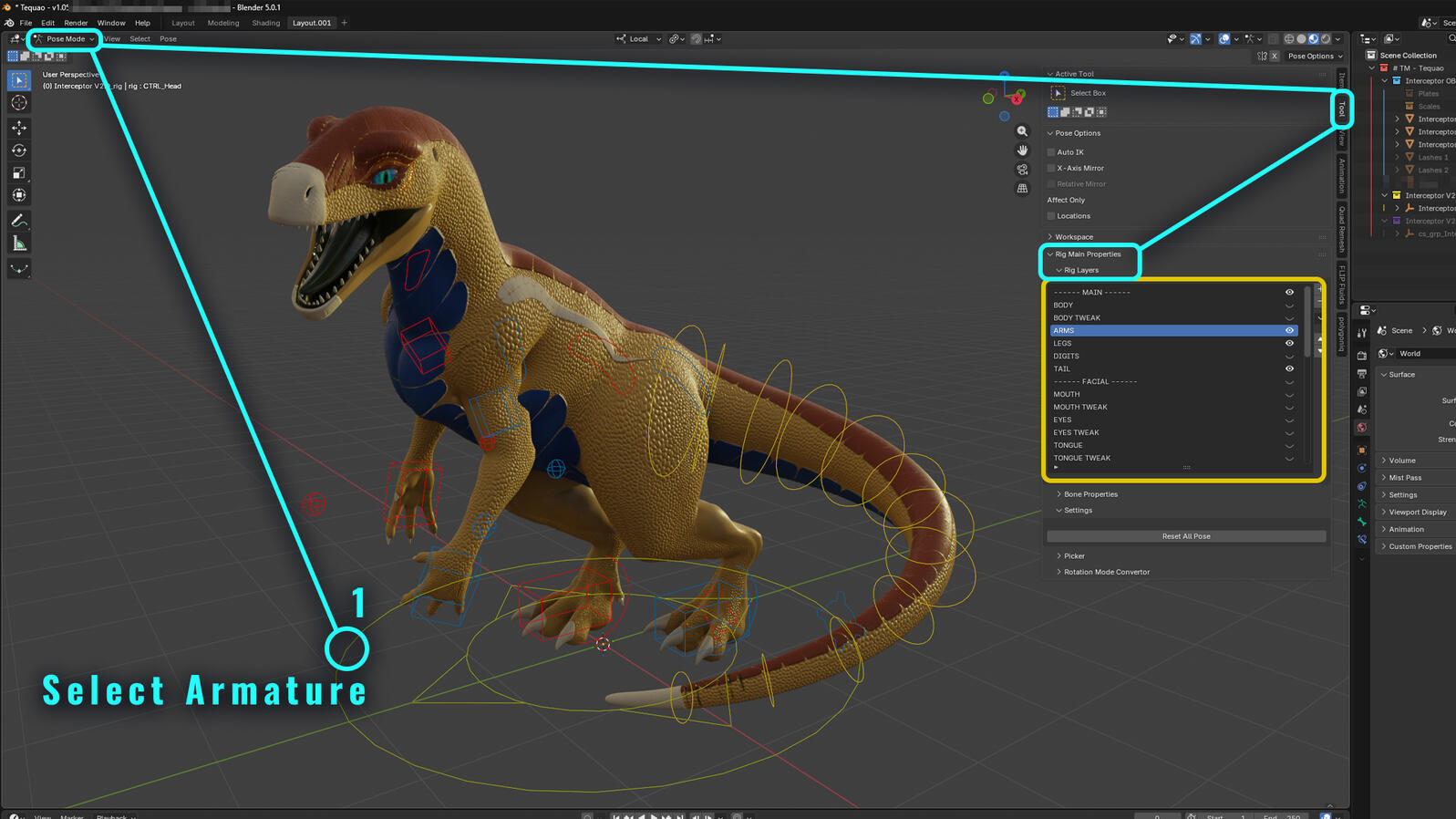
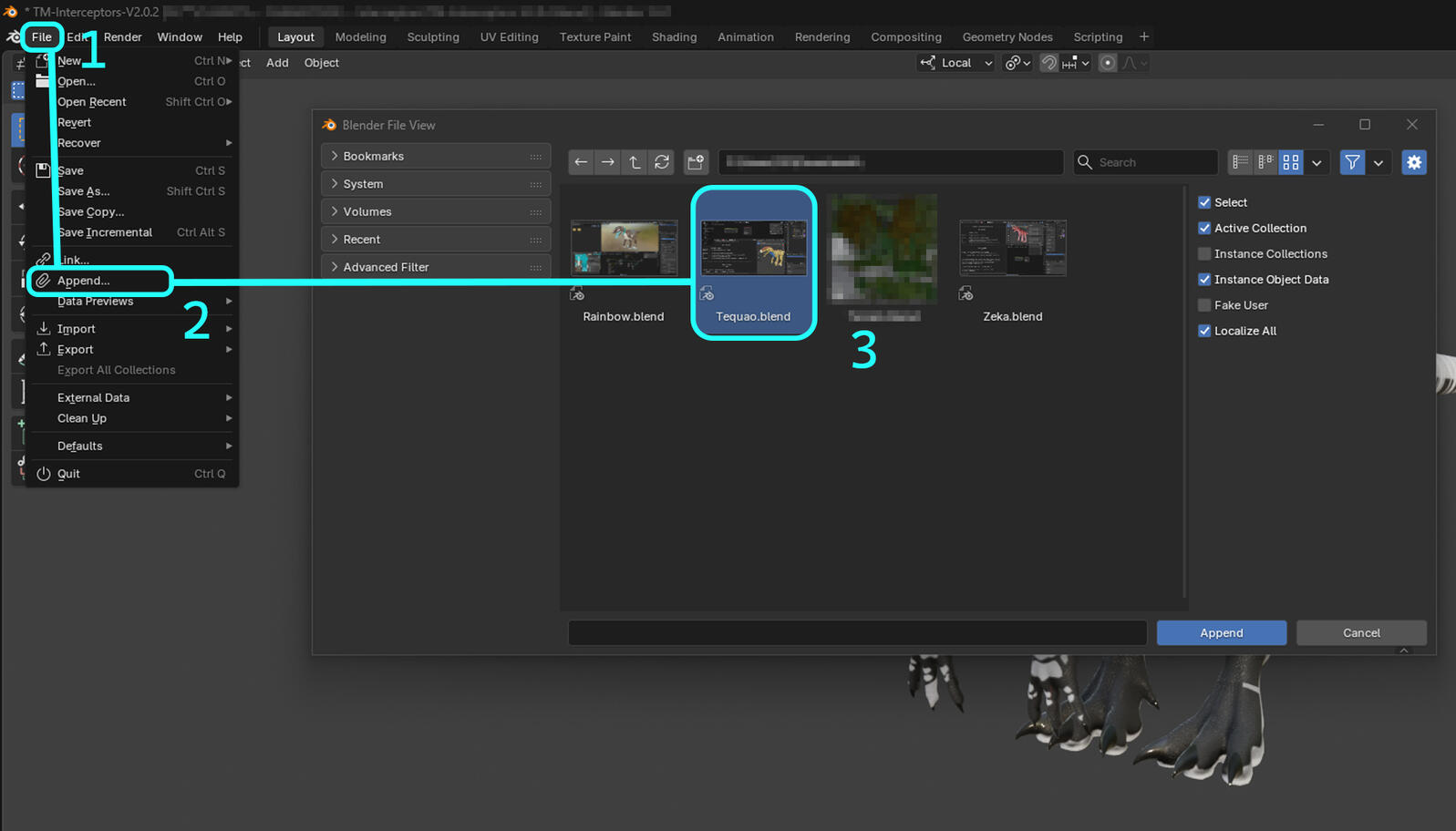
| 1 | Import interceptor into new or existing project. (How to Append/Import Interceptor) |
| 2 | Select the interceptor's armature / rig. |
| 3 | Go into Pose Mode in the top left. |
| 4 | In the right toolbar, go into Tool > Rig Main Properties > Rig Layers - Dont see the Rig Main Properties? Install RigTools |
| 5 | Hide or Un-Hide layers by using the eye toggle on the right. |
| 6 | Select the portion of the rig to edit, you can Scale, Rotate, and Move most parts! |
| 7 | Have Fun |
How to Edit the Interceptors Gender
ThatWIP
This area is under construction.
For help please contact ThatMan.
Interceptor V1.03 vs v2.01

Support Jinnoaka by purchasing the Interceptor Model!
General Info
| Version | Publish Date | Description |
|---|---|---|
| Blender 5.0 fixes for ARP Rigs | Nov 27, 2025 | Hotfix for updated RigTools |
| v2.01 | Oct 29, 2025 | Hotfix for Jaw |
| v2.0 | Oct 18, 2025 | Interceptor 2.0 Release, adding toggleable plates, extra scales, eyelashes, and toggleable genders. |
| Interceptor V2 Preview | Oct 12, 2025 | Preview of the upcoming v2.0 Interceptors |
| v2.0 Progress Update | Feb 18, 2025 | Progress report of the upcoming v2.0 Interceptors |
| Interceptor V1.2 | Sep 14, 2023 | Minor update to the Interceptors textures |
| Interceptor Cloaca Version Beta | Jun 22, 2023 | Beta release of Interceptor Cloaca |
| v1.03 | May 06, 2023 | Hotfix for the tongue and default bone positions. |
| Interceptor Updates | Nov 14, 2022 | Some Updates and Fixes to the Interceptor |
| Interceptor Release | March 28, 2023 | Release of the model to the public on Furaffinity. |
v1.03
Great Eye rig
Yes Tail and tongue FK and IK
Small customizability
No Gender Toggle
Blender ~3.0
v2.01
Bugged Eye rig
No Tail and tongue IK
Better Color customizability and stability
Better Gender toggles
Blender 5.0+
New Plates, Scales, Eyelashes, and Male Parts
New Rig using RigTools Pro
Updated Female internal parts
In terms of ThatMan's Commissions:
Due to the introduction of the v2.01 Interceptor, ThatMan will only do one gender or sfw for v1.0 - v1.03, and will make a SFW, Male/Female version for any Interceptor edit for v2.0+.
But the model!

Support Jinnoaka by purchasing the Interceptor Model!
How To apply the interceptor skin
This step by step will teach you to apply a new texture to an old or existing material. This also works for updating textures. This works for v1.03 and v2.01
| Step N0 | Step Info |
|---|---|
| 1 | Import interceptor into new or existing project. (How to Append/Import Interceptor) |
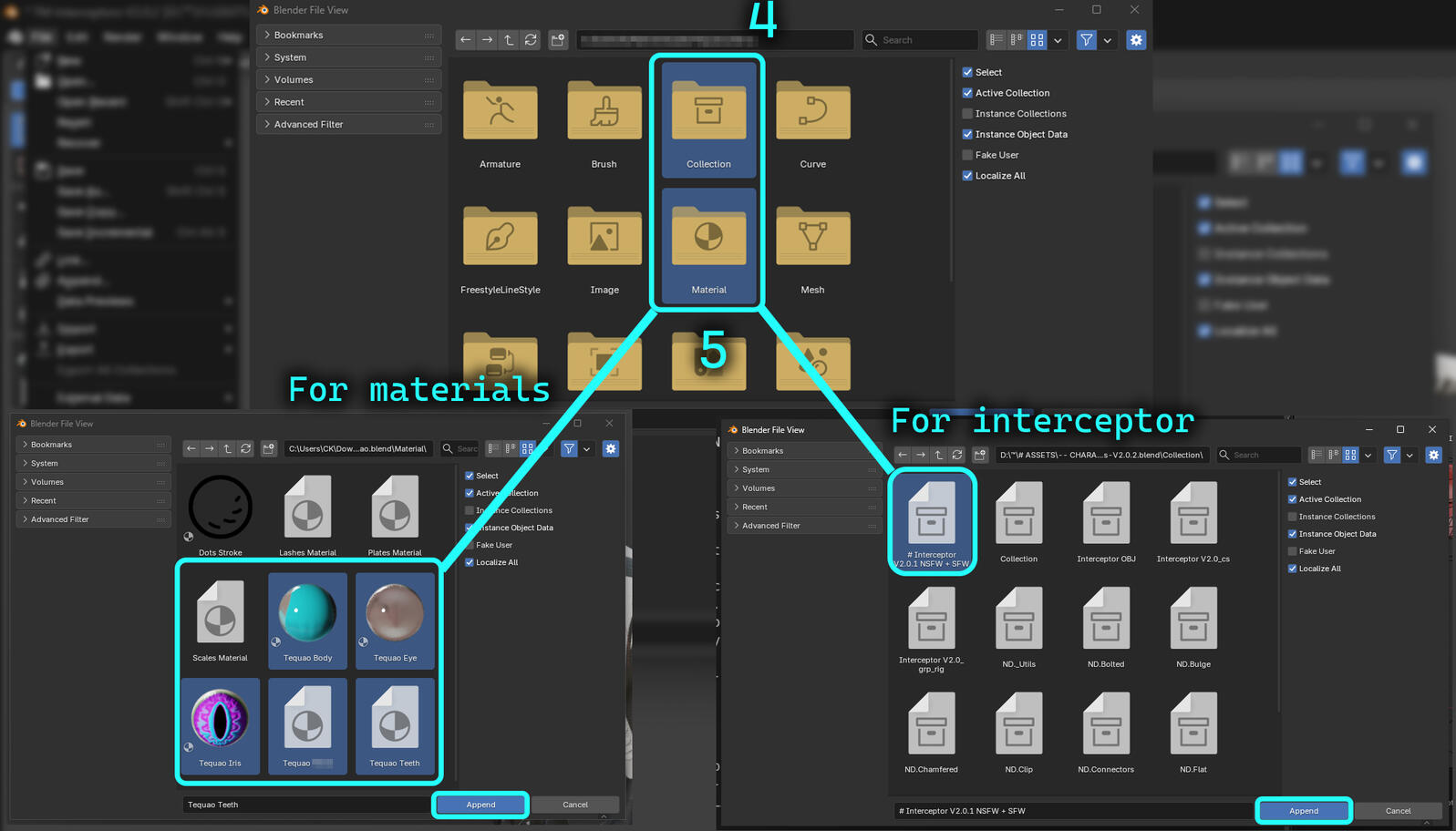
| 2 | Append interceptor Custom Skin materials. The Main Body, the Iris, the Eye, and if applicable the Teeth and other changed areas. |
| 3 | Hide Scales and Plates collection; unless you want them. (Make sure their render icon is on if you do) |
| 4 | Select the interceptor main body (Not the Rig) and replace it with the new Main Body material. |
| 5 | Repeat the next steps for the eye, teeth, and others. Make sure to replace the Eye and Iris in its respective slots. |
| M | If you need to replace the Male parts, make sure to change its gender to do so. (How to Change Gender?) |
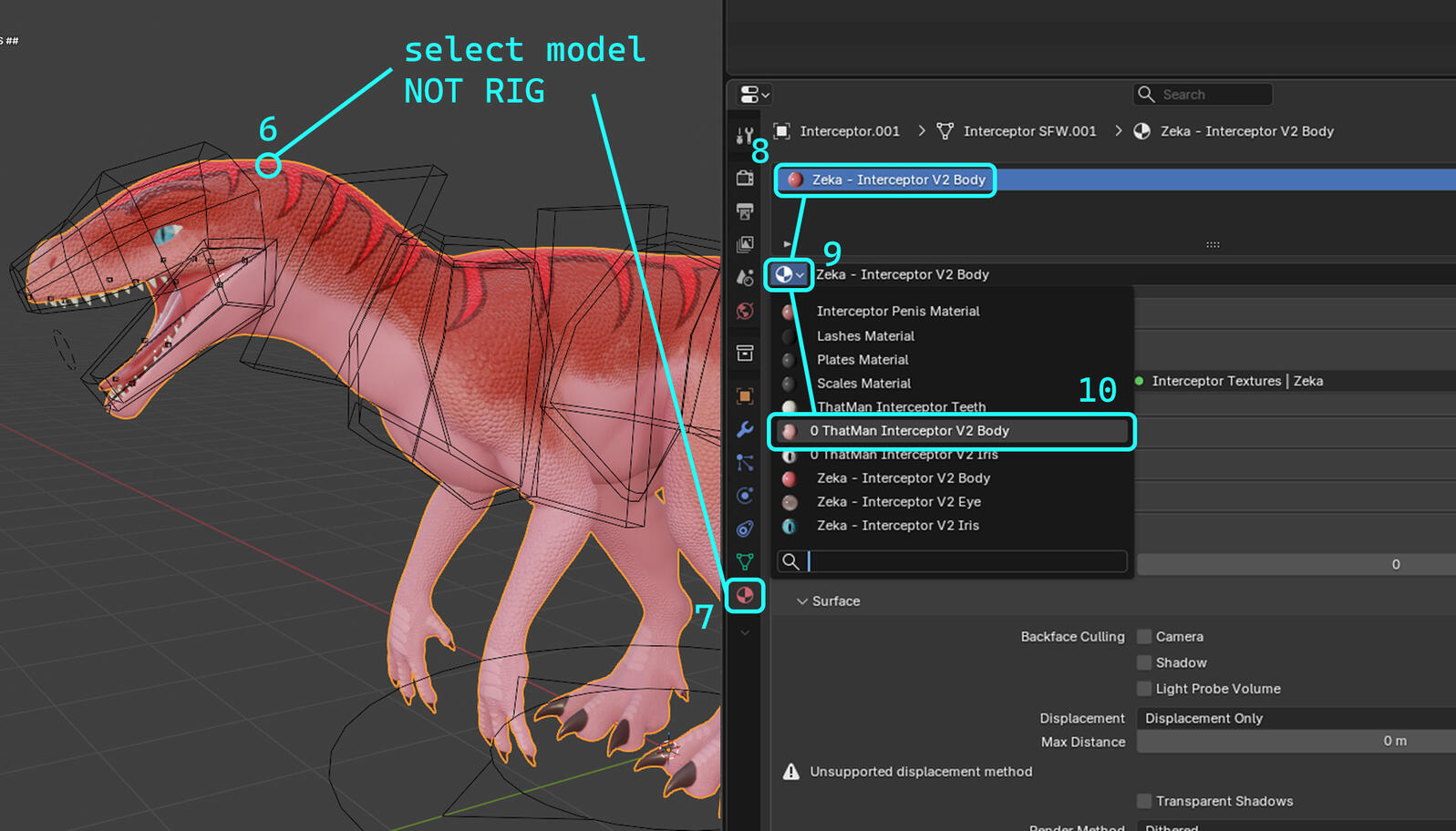
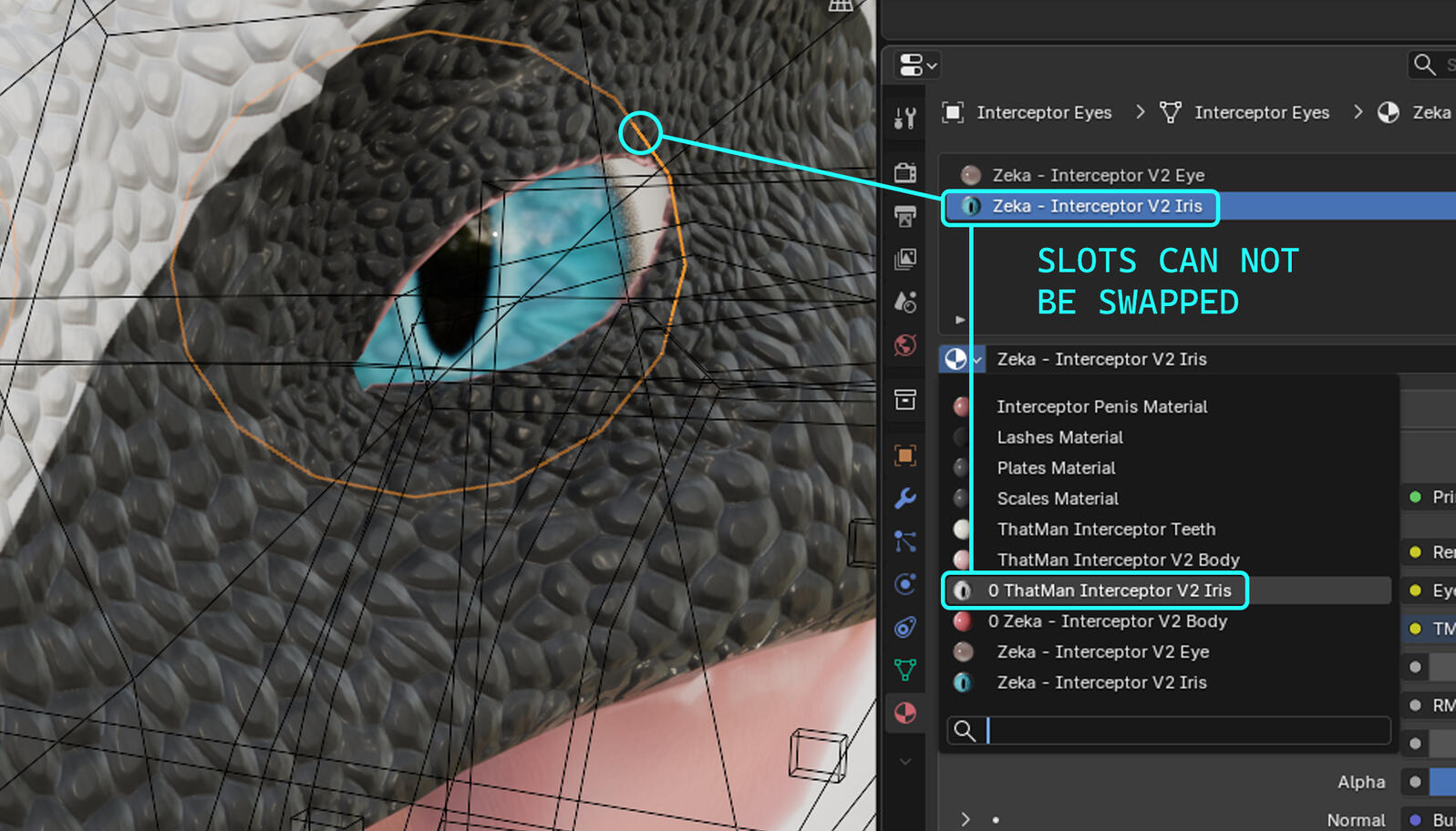
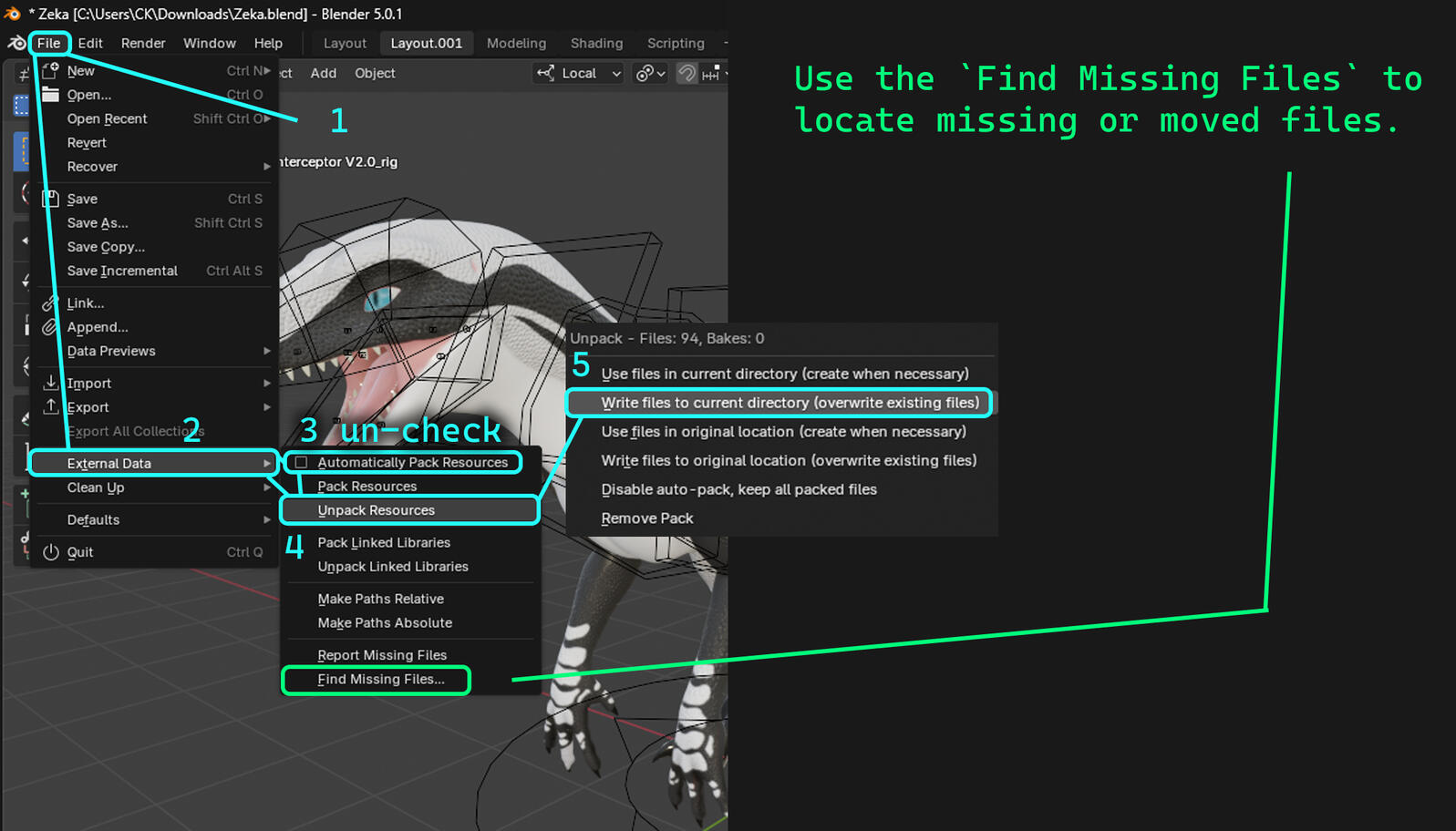
Missing Materials or 'Pink' Materials and Unpacking Materials
When a material or texure is missing use the Find Missing Files and select texture folder.
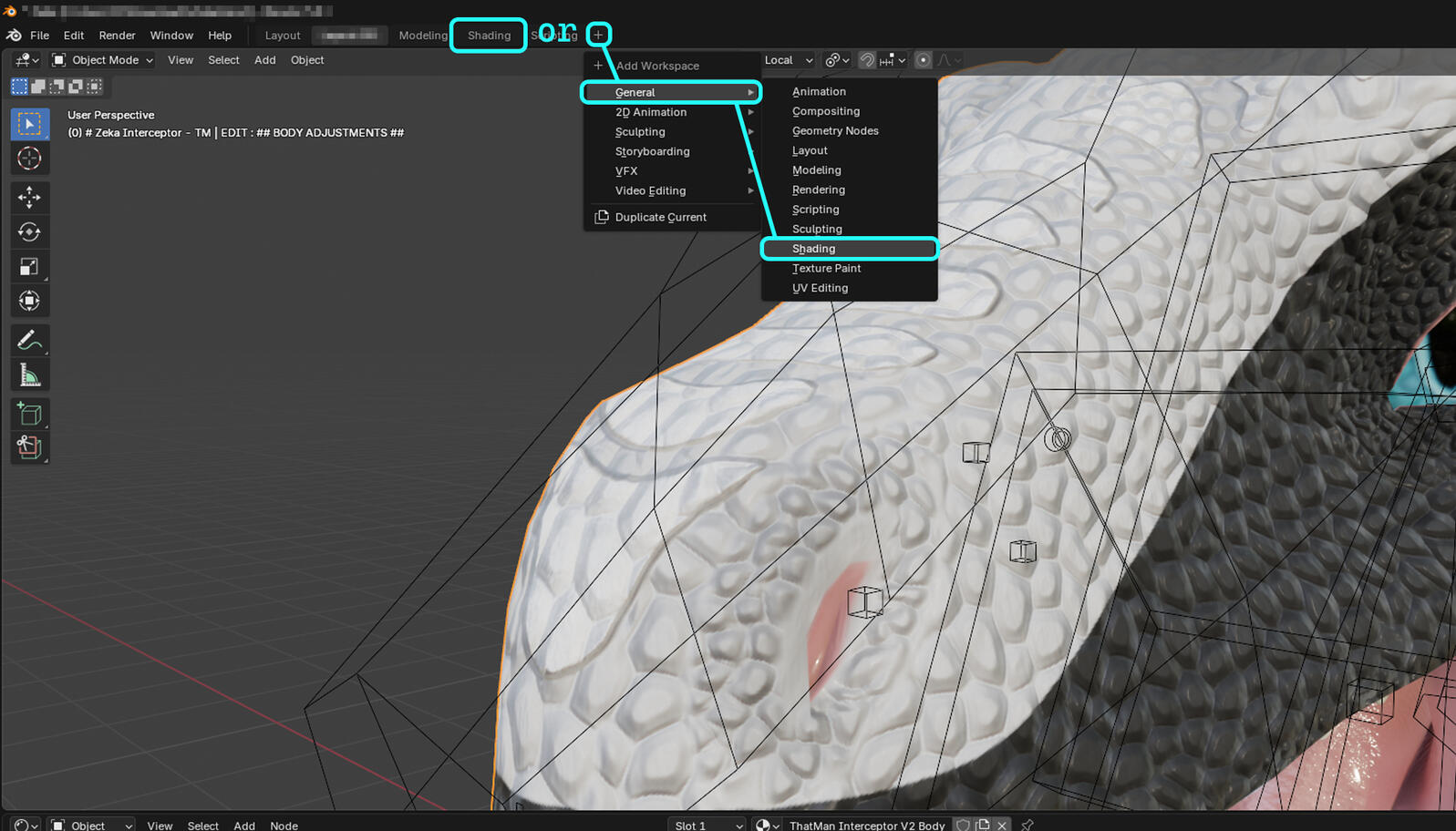
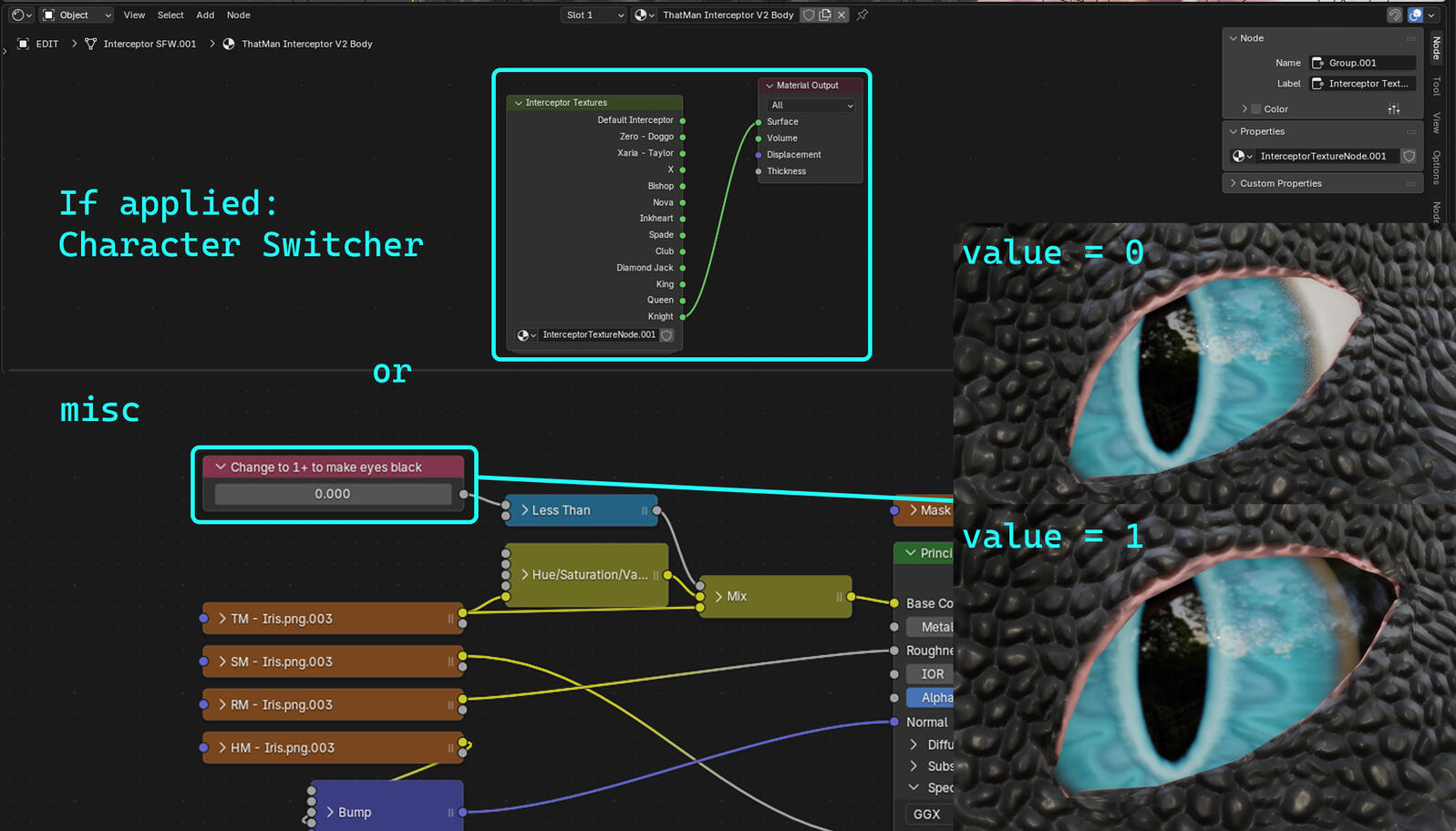
Properties inside MaterialsEdited inside of the Shader Editor within Blender
how to use the interceptor model
| Step N0 | Step Info |
|---|---|
| 1 | Download Interceptor Blend File and Textures* from Jinnoaka and/or ThatMan's Custom Interceptor. (Sometimes you dont need to download the textures as the files are packed. Sometimes you do. If textures are pink, check me out.) |
| 2 | Append the interceptor into a new or existing project. (Edits to main project is not advised, make backups!) |
| 3 | Hide Scales and Plates collection; unless you want them. (Make sure their render icon is on if you do) |
| 4 | Double check textures and rig. It is REQUIRED to have the RigTools addon; and is located when downloading the Interceptor for the first time. (How to install Rig Tools) |
| 5 | Unpack textures for better performance and RAM usage. (How to unpack textures?) |
| 6 | Have Fun! |
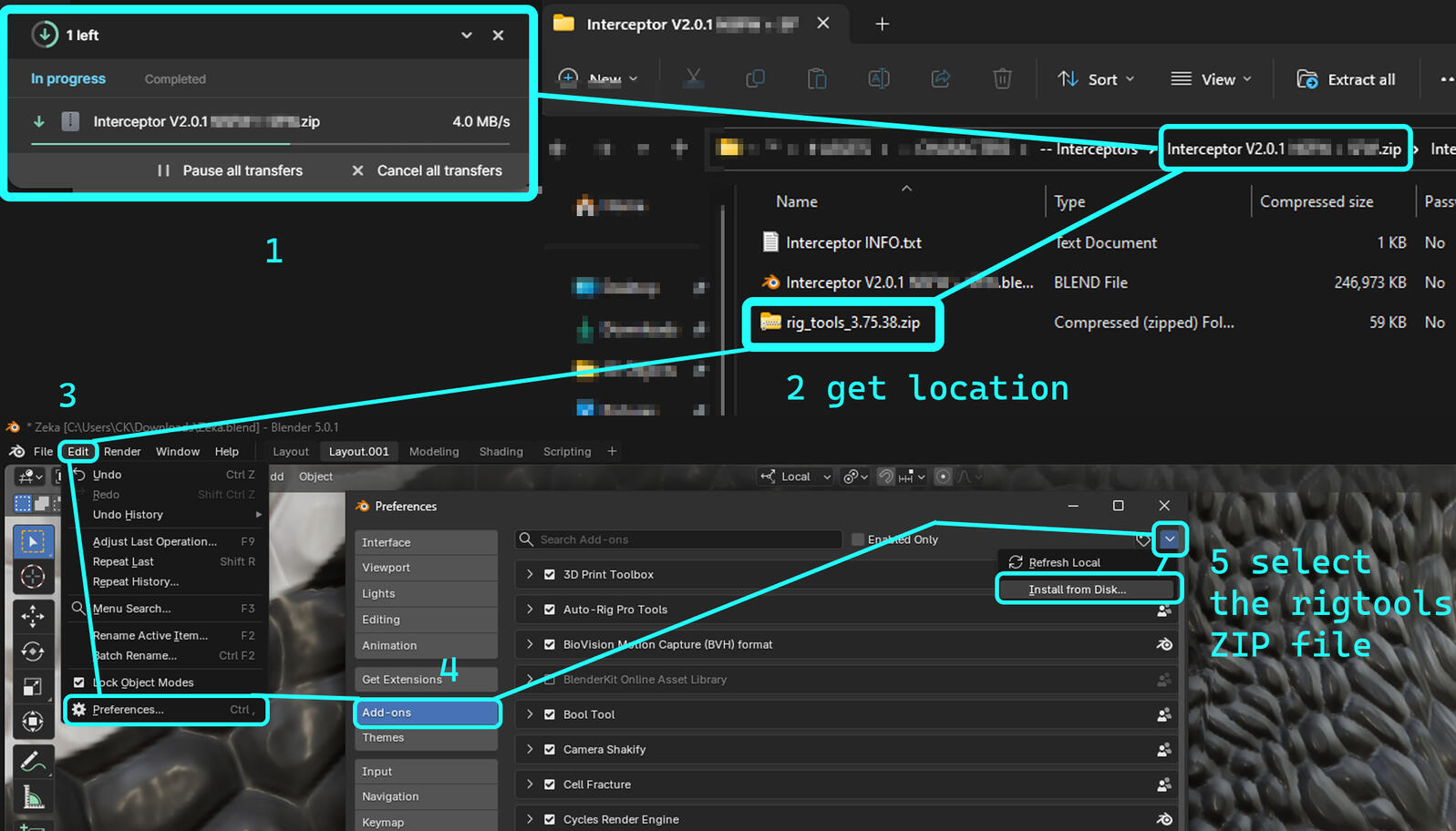
how to install RigTools
| Step N0 | Step Info |
|---|---|
| 1 | Download Interceptor Zip File from Jinnoaka. |
| 2 | Unzip and locate the RigTools Zip File. DO NOT UNZIP |
| 3 | Go into Blender > Edit > Preferences >> Add-ons > Install from Disk |
| 4 | Select the RigTools Zip file and add it. Make sure it is checked and enabled. |
Get Interceptor Rig Tools Here
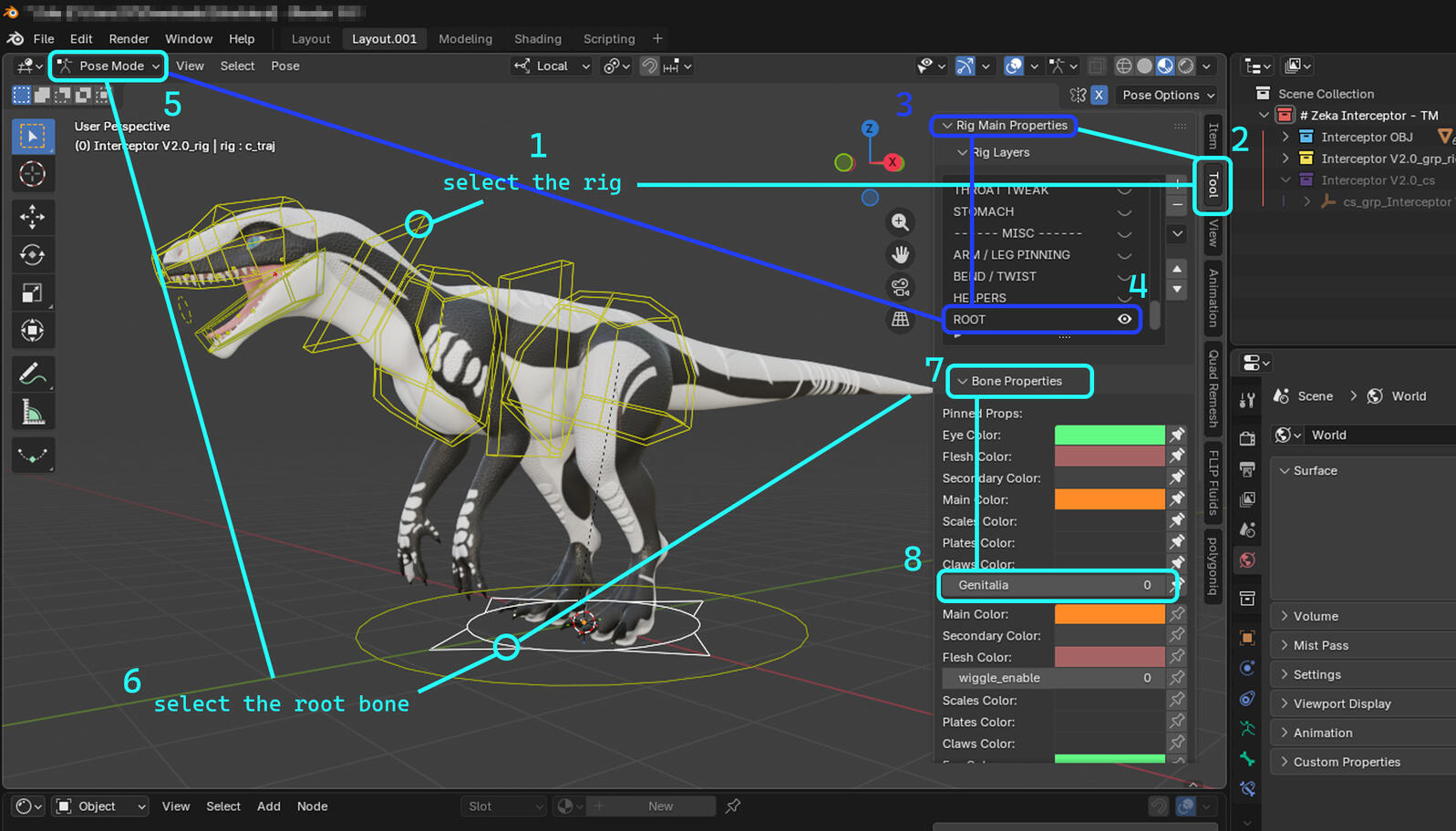
how to edit an interceptors gender
| Step N0 | Step Info |
|---|---|
| 1 | Select Interceptor's rig layer. |
| 2 | Go into the Tool tab in the right side of the screen. (Dont see the Tool Tab?) |
| 3 | Select Rig Main Properties and Rig Layers(Dont See Rig Main Properties?) |
| 4 | Show the Root bone at the bottom and select the circle with the arrows. If you dont see the circle with arrows, you need RigTools or need to un-hide the bone layer called Root. |
| 5 | Go back to Rig Main Properties and inside of Bone Properties (while root bone selected), change Gender using the Genitalia value. (Refer Bellow for Genders.) |
0 = SFW / Null
1 = Female NSFW Required
2 = Male NSFW Required